Node Editor
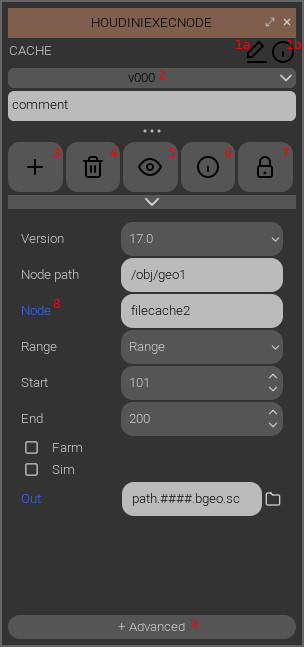
1a: rename the node (Will also rename all files in its folder).
1b : see the data dictionary of this node
2: select active version.
3: add a new version, duplicating values from this one.
4: delete the current version.
5: visualize the graph state of the last execution of this version.
6: see the data dictionary of this version.
7: lock this version, no action or parameter modification will be allowed.
8: the label is blue when the parameter has changed from the default value.
9: show advanced parameters and force to use a specific type version.
Data dictionary
The data dictionary is a set of custom values associated with names.
Values are get and set with the Api functions. The node AND its versions have a data dictionary.
New versions do not inherit the data dictionary of the active version.
Graph state
Each time a node is executed, the graph is saved in a json file in the node’s folder : “.exec_state_vXXX” with XXX is the version number. This graph can be opened with the eye button but can not be edited nor executed.